
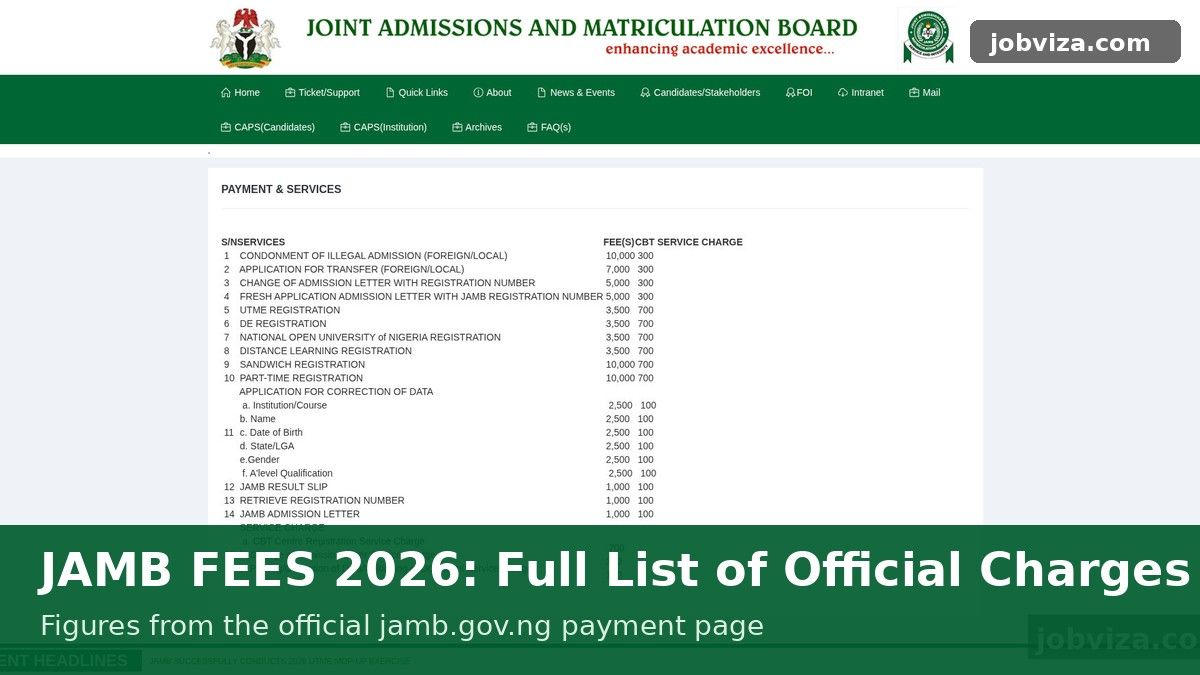
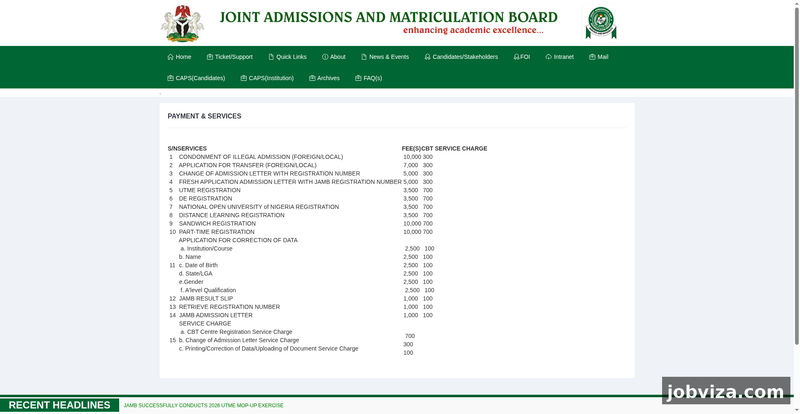
Screenshot of the official JAMB Payment and Services page at jamb.gov.ng
If you are paying for anything on the JAMB portal, the first question is usually how much. This guide lists the JAMB service fees we could read on the board’s official payment page, with the amount for each item. Where the page does not show a figure clearly, it says check the official site, so you are never guessing with your money.
Reviewed by Miles Obi
Official payment page: https://jamb.gov.ng/Payment-Services
How to read JAMB fees
JAMB lists most services with a main fee in naira, and some items have a separate service charge listed in a service charge section of the same page. Amounts can change between cycles, so confirm the figure on the official page before you pay. Do not rely on an old screenshot, a forum post or a message from a friend.
UTME registration fee
The official payment page lists UTME registration at 3,500 naira. A separate CBT Centre Registration Service Charge of 700 naira is listed in the service charge section. The official list shows the 700 naira charge as a service charge, so check the official site to confirm it applies to your registration before you pay.
For the full step-by-step process, read our guide on how to register for JAMB UTME.
JAMB result slip fee
The official list shows the JAMB result slip at 1,000 naira. A 100 naira printing or uploading service charge is listed separately in the service charge section. Check the official site to confirm whether that 100 naira charge applies to the result slip before you pay.
Correction of data fee
If something on your JAMB record is wrong, the official list shows a correction fee of 2,500 naira for each item. The items listed are:
- Institution and course
- Name
- Date of birth
- State and local government area
- Gender
- A-level qualification
Each item is charged at 2,500 naira. The page also lists a 100 naira printing, correction of data or document upload service charge. Check the official site for how many corrections can be requested in one application.
Fresh admission letter fee
The official list shows 5,000 naira for a fresh application admission letter with your JAMB registration number. A separate 300 naira change of admission letter service charge is listed in the service charge section. Check the official site to confirm which charge applies to your request.
Transfer application fee
The official list shows the application for transfer at 7,000 naira, for foreign and local transfers. We could not confirm a separate 300 naira local transfer figure on that line, so for a local transfer check the official site for the exact amount before you pay.
Condonment of illegal admission fee
The official list shows the fee for condonment of illegal admission at 10,000 naira, for foreign and local cases. We could not confirm a separate 300 naira local figure on that line, so check the official site for the category that applies to you before you pay.
Sandwich and part-time registration fee
The official list shows sandwich registration at 10,000 naira and part-time registration at 10,000 naira. Check the official site for any service charge that applies to these registrations before you pay.
Other items: check the official site
Items not listed in this guide, or not shown clearly on the official page when we checked, need to be confirmed on the official site: https://jamb.gov.ng/Payment-Services.
Fee summary
- UTME registration: 3,500 naira, with a 700 naira CBT service charge listed separately
- JAMB result slip: 1,000 naira, with a 100 naira service charge listed separately
- Correction of data: 2,500 naira for each item, with a 100 naira service charge listed separately
- Fresh admission letter with registration number: 5,000 naira, with a 300 naira change of admission letter service charge listed separately
- Transfer application: 7,000 naira (check the official site for local cases)
- Condonment of illegal admission: 10,000 naira (check the official site for local cases)
- Sandwich and part-time registration: 10,000 naira each
- Any other item: check the official site
How to pay JAMB fees safely
Go to the official JAMB payment page first, pick the service you need and follow the instructions there. Keep your payment receipt and your registration number somewhere safe, because you will need them if something goes wrong later.
Why the service charge matters
Add the main fee and the service charge together before you pay, and check that the total on the payment screen matches. If it does not, stop and check the official site.
How to budget for a correction
Corrections are the item most candidates underestimate. The main fee is charged for each item you correct, so a request that touches several fields can add up quickly. Before you apply, list every field that is wrong and check which ones really need a correction. Fix only the fields that are actually wrong, and keep the supporting documents ready, because the request may ask for them to be uploaded.
Mistakes in name spelling, date of birth and state of origin are common, and they are easy to avoid by checking your details on your JAMB profile early. Do this well before any deadline, so you are not rushing to correct a record on the last day.
How to budget for an admission letter
An admission letter fee applies when you need a new letter with your registration number. Do not request one until you know which institution and course you are using it for, because a wrong request can cost you a second payment. Save the letter as a file and print a copy as soon as it is available.
Keeping proof of payment
Every JAMB payment should leave you with a receipt or a transaction reference. Save that reference in a note on your phone and take a screenshot of the confirmation page. If a payment is debited but the service does not appear, the reference is what you will use to ask for help. Without it, the problem is much harder to prove.
Keep your registration number, your payment reference and the date of payment together in one place. This takes two minutes to do and can save weeks of stress later.
Scam warning
Scam-awareness: JAMB does not ask you to pay fees into a personal bank account, a personal phone number or through a random link sent on WhatsApp or social media. Anyone who asks you to pay this way is trying to take your money. Pay only through the official JAMB site, and check the official site if anyone quotes you a different amount.
Frequently asked questions
Do I pay again if my first payment fails? Not until you have checked your payment status on the official site. Keep your transaction reference, because it is your proof if money leaves your account but the service does not show up.
Do the amounts apply to every candidate? The fees apply to the services named on the official list. Your category, such as foreign or local, can change which line applies, so read the line that matches your case.
Where can I read about the registration process? Read our guide on how to register for JAMB UTME.
Final checklist before you pay
- Confirm the service you need on the official page
- Check the amount and any service charge before you pay
- Pay only through the official JAMB route
- Keep the receipt and your registration number
- Check the official site for any item not listed here
Related guides
- How to register for JAMB UTME: step-by-step guide
- JAMB biodata correction: how to correct your details
- How to check JAMB admission status via SMS (55019)
- How to check your admission status on JAMB CAPS
Discover more from Jobviza
Subscribe to get the latest posts sent to your email.